Troubleshooting PEQ-2A
Find quick troubleshooting answers for the SomoGear PEQ-2A, including battery installation, LED indicator status, low battery warnings, recoil-related power interruption, and O-ring installation.
Always make sure the battery is installed in the correct positive and negative direction. If the PEQ-2A does not power on, remove the AA battery and check the battery direction, battery condition, and contact points before testing again with a new or fully charged battery.
If your PEQ-2A keeps flashing while it is not set to flash mode, the battery is likely low. Please replace it with a new or fully charged battery and test again.
The LED indicator helps show the device status:
Green light: Working correctly
Red light: Low battery

First, check whether the battery is installed in the correct positive and negative direction. Then make sure the battery is new, fully charged, and not faulty.
If possible, test the PEQ-2A again with another suitable battery. If the indicator light still does not turn on, please contact SomoGear support with a short video showing the battery installation and the issue.
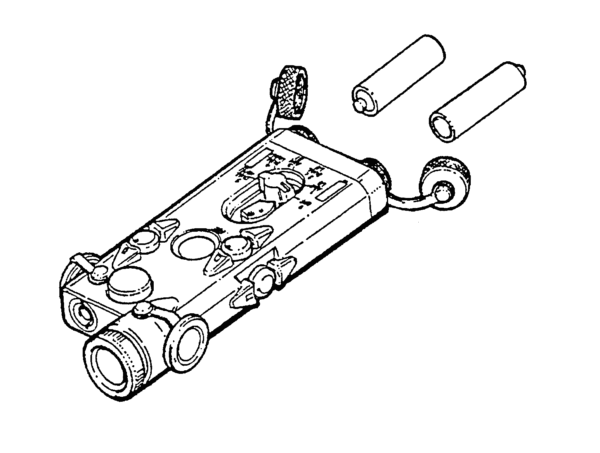
If the PEQ-2A cuts off during GBB recoil, the battery may be moving inside the battery compartment under recoil. Please install the O-ring included in the package according to the product instructions, then test the device again.
The O-ring helps improve battery contact and may reduce recoil-related power interruption.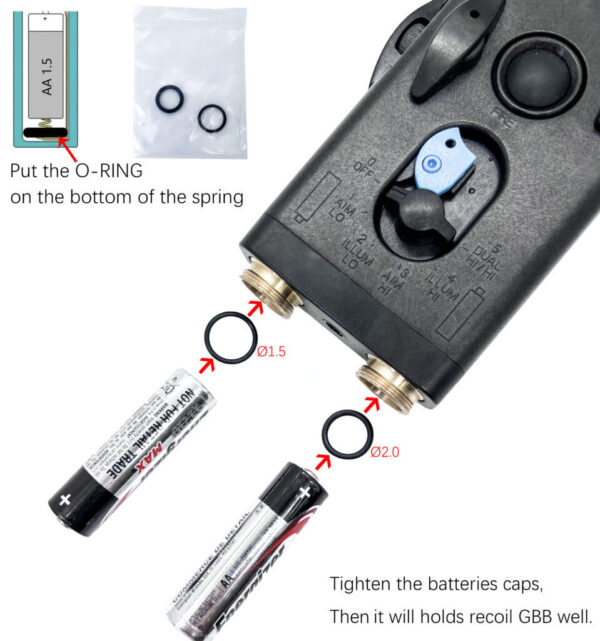
What should I do if the troubleshooting steps do not solve the issue?
If the issue remains after checking the battery, LED indicator, tail jack spring, mount, and zeroing operation, please contact SomoGear support at support@somogear.com.
Please include your order number, product model, and a short video clearly showing the issue. SomoGear will review the case and reply within 48 hours.