SomoGear IR Illuminator Pulse Rates Operation Manual
In addition to momentary and continuous modes of operation, the IR illuminator may be programmed to operate in pulse mode at either 1, 2, 4, 8 pulses per second.
To access the programming mode, the mode selector must be turned to the desired pulse rate within 5 seconds of pressing the FIRE button.
- With the Mode Selector turned to the P (program) position, hold down the FIRE button, orange indicator light up.
- Turn the Mode Selector to the IR position that corresponds to the desired pulse rate as shown in Table below.
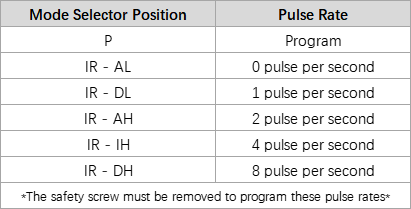
- Release the FIRE button, the orange indicator flashing 2 times, and the pulse rate will be programmed, the set pulse rate will remain until it is programmed differently or canceled
How to cancel the Pulse Rate?
- Set the rate to 0 pulse per second
WARNING:
- Do not stare into the laser beams
- Do not look into the laser beams through binoculars or telescopes
- Do not point the lasers beams at mirror-like surfaces
- Do not shine the laser beams into other individuals’ eyes